
PIFRA Salary Slip Month Wise 2026 – Download Online via CNIC & Email
The PIFRA Salary Slip Month Wise 2026 service is a major digital facility provided by the Government of Pakistan to ensure transparent, paperless, and timely salary disbursement records for government employees. Through this system, employees working in federal, provincial, district, and autonomous government departments can receive their monthly salary slips directly via email in PDF format.
This service is especially important for income tax filing, loan applications, visa processing, audit records, and personal financial documentation. As part of Pakistan’s broader e-governance reforms, PIFRA continues to modernize payroll reporting through integration with the Financial Accounting & Budgeting System (FABS).
Slip Download Month Wise 2026
What Is PIFRA Salary Slip System?
The PIFRA salary slip system allows registered government employees to:
- Receive monthly salary slips automatically
- View complete pay structure and deductions
- Avoid physical visits to accounts offices
- Maintain verified salary records for official use
Once registered, no monthly login is required. Salary slips are emailed automatically, usually before the 10th of every month, depending on departmental payroll processing.
Online PIFRA Salary Slip Registration 2026
Government employees can register online through the official PIFRA portal.
Official Website
👉 www.pifra.gov.pk
👉 Mobile Portal: m.pifra.gov.pk
Step-by-Step Registration Process
- Visit the official PIFRA website
- Go to Services → Online Salary Slip / Pension Slip
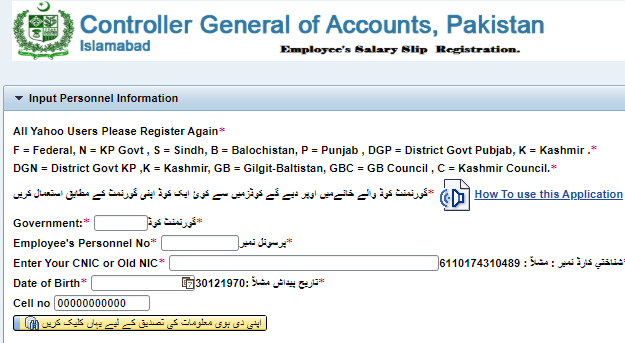
Fill out the registration form with:
- Government Code (F, P, S, N, B, etc.)
- Employee Personnel / Personal Number
- CNIC (New or Old)
- Date of Birth
- Mobile Number
- Active Email Address (Gmail recommended)
- Submit the form
- Verify details using OTP (if prompted)
- Receive confirmation of successful registration
Once approved, salary slips are delivered automatically each month.
PIFRA Salary Slip Month Wise Download 2026
After registration, employees do not need to download slips manually from any dashboard.
How Month-Wise Salary Slips Work
- Salary slips are emailed every month
- Format: PDF
Includes:
- Basic Pay
- Allowances
- Deductions
- Net Salary
If the slip is not visible:
- Check Spam / Junk folder
- Search “PIFRA Salary Slip” in Gmail
- Ensure email details are correct in the PIFRA system
Month-Wise PIFRA Salary Slip (January–December 2026)
| Month | Salary Slip Status |
|---|---|
| January | Available via Email |
| February | Available via Email |
| March | Available via Email |
| April | Available via Email |
| May | Available via Email |
| June | Available via Email |
| July | Available via Email |
| August | Available via Email |
| September | Available via Email |
| October | Available via Email |
| November | Available via Email |
| December | Available via Email |
Slips are issued once salary processing is completed by the concerned accounts office.
PIFRA Province & Department Codes
| Province / Department | Code |
|---|---|
| Federal Government | F |
| Punjab | P |
| Sindh | S |
| Khyber Pakhtunkhwa | N |
| Balochistan | B |
| Gilgit Baltistan | GB |
| District Govt Punjab | DGP |
| District Govt KP | DGN |
| Kashmir / AJK | K |
Correct selection of code is critical during registration.
Information Required for PIFRA Salary Slip Registration
- Province / Department Code
- Employee Personal Number
- Full Name
- CNIC Number
- Date of Birth
- Mobile Number
- Email Address (Gmail / Yahoo)
- Pay Scale (BPS)
What to Do If PIFRA Salary Slip Is Not Received?
If you do not receive your salary slip:
- Wait 2–3 working days
- Recheck spam folder
- Verify registration details
- Submit a complaint through the official PIFRA contact channel
This issue is usually due to incorrect email, delayed payroll processing, or system synchronization.
Format & Details of PIFRA Salary Slip
Each salary slip includes:
- Basic Pay
- House Rent Allowance
- Conveyance Allowance
- Medical Allowance
- Adhoc Relief Allowance
- Income Tax Deduction
- Group Insurance
- Gross Salary
- Net Pay
This standardized format makes PIFRA slips universally acceptable for official and financial purposes.
PIFRA Official Contact Information
Office Address:
PIFRA FABS Directorate, AGPR Complex, G-8/4, Islamabad
Phone: 051-9107248
Official Website: www.pifra.gov.pk
Office Timing:
Monday to Friday – 9:00 AM to 5:00 PM
FAQs
How do I get my PIFRA salary slip online?
Register on the official PIFRA website. After approval, salary slips are emailed monthly.
Is PIFRA salary slip valid for bank and tax use?
Yes. It is an official government-verified document.
Can I change my email address later?
Yes, by updating your information through the PIFRA portal.
When are salary slips issued every month?
Usually before the 10th of each month, subject to payroll processing.
Can't find what you're looking for? Search below:
