
CDA Employees Pay Slip 2026 Online Download PDF
epayslip.cda.gov.pk Portal login Monthly Wise Pay Slip
The Capital Development Authority (CDA) is the main government organization responsible for urban planning, infrastructure development, and municipal services in Islamabad. Its responsibilities include land management, sanitation, housing development, environmental protection, road maintenance, and regulation of commercial activities across the federal capital. CDA employs a large workforce, including engineers, administrative officers, technical staff, and field workers, to manage and maintain the city’s infrastructure.
To make salary information more accessible, CDA provides employees with an online e-PaySlip system. Through this facility, employees can view and download their monthly salary slips, including details of basic pay, allowances, deductions, taxes, and net salary. The digital system improves transparency, reduces paperwork, and allows employees to access their pay records without repeatedly visiting the accounts office.
CDA Employee Pay Slip 2026
CDA Employee Pay Slips for 2026 are now available for download, allowing employees to keep track of their earnings and deductions on a month-by-month basis. CDA employees can use this tool to effectively plan their finances and gain a comprehensive understanding of their overall compensation.
epayslip.cda.gov.pk Portal login
The CDA e-PaySlip portal can be accessed by employees using their Employee ID and password at https://epayslip.cda.gov.pk. If you forgot your password, you can reset it by following the instructions provided. An employee’s e-PaySlip contains essential information such as basic salary, bonuses, provident fund contributions, tax deductions, and other benefits. With this online system, physical payslips are no longer required and salary information is always secure and accessible. Support services are available to CDA employees via email or helpline for any issues. As part of CDA’s efforts to improve employee convenience, this initiative aligns with its efforts to modernize administrative processes.
| SR | Month | Action |
| 1. | January | Download Slip |
| 2. | February | Download Slip |
| 3. | March | Download Slip |
| 4. | April | Download Slip |
| 5. | May | Download Slip |
| 6. | June | Download Slip |
| 7. | July | Download Slip |
| 8. | August | Download Slip |
| 9. | September | Download Slip |
| 10. | October | Download Slip |
| 11. | November | Download Slip |
| 12. | December | Download Slip |
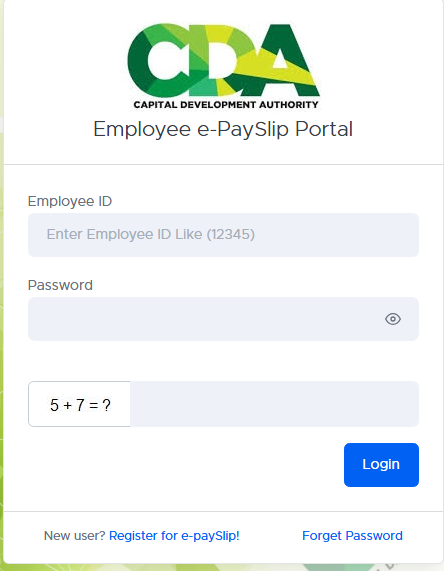
How to Download Capital Development Authority Pay Slip
-
Visit the Portal: Navigate to https://epayslip.cda.gov.pk/.
-
Log In:
- Enter your Employee ID.
- Enter your Password.
-
New User Registration:
- If you’re a new user, click on the “New user? Register for e-paySlip!” link.
- Follow the prompts to complete your registration.
-
Forgot Password:
- If you’ve forgotten your password, click on the “Forget Password” link.
- Follow the instructions to reset your password.
FAQS
1. How can CDA employees access their pay slip online?
Employees can access their pay slips by visiting the CDA e-PaySlip portal at https://epayslip.cda.gov.pk, logging in with their Employee ID and password.
2. What if I forget my password?
If you forget your password, click on the “Forget Password” link on the login page and follow the instructions to reset it.
3. How do I register for the CDA e-PaySlip system?
New users must click on “New user? Register for e-PaySlip!” and provide the required details, including Employee ID, CNIC, and email, to create an account.
4. What information is included in the CDA pay slip?
The pay slip includes details such as basic salary, allowances, deductions, provident fund contributions, tax deductions, bonuses, and net salary.
5. Can I download or print my CDA pay slip?
Yes, once you access your pay slip, you can download it in PDF format and print it for record-keeping.
6. What should I do if my salary slip has incorrect details?
In case of errors in your pay slip, contact the CDA finance department or HR office to get it rectified.
7. Can retired employees access their old pay slips?
Retired employees may need to contact the CDA HR or finance department to obtain past salary records, as online access may not be available after retirement.
8. Is the CDA e-PaySlip portal secure?
Yes, the portal is secured with login credentials, ensuring that only authorized employees can access their salary details.
9. How frequently are new pay slips available on the portal?
New pay slips are usually uploaded at the end of each month.
More Related Resources
Can't find what you're looking for? Search below:
